Displaying 96-108 of 144 Results

Epic Phase 2 update: Classes beginning soon

In 2020, Ballad Health successfully implemented Epic Phase 1 by installing Epic as Ballad Health’s electronic medical record system (EMR). This implementation connects our patients’ hospital and clinic medical records on one platform. Epic Phase 2 is underway and impacts these areas: Three long-term care facilities All six of our retail pharmacies Home Health and Hospice Inpatient and outpatient rehabilitation services Epic Phase 2 End-User training begins June 13 marks the first day of scheduled, in-person training for all team members affected by the Epic Phase 2 rollout. These classes will continue through July 22, the week before go-live. Your manager should have already shared your class schedule with you, but you can also find your schedule in HealthStream along with the name of your classes and the address for your training location. Additionally, you will receive an email reminder two days before each of your classes.You can click here to see a location guide…


Our new email retention policy takes effect on Monday, June 6; are you ready?

Beginning on Monday, June 6, any emails older than 90 days will be automatically deleted from Outlook; this is a change from our previous Ballad Health policy of 180 days. So if you have any emails you want to save that are at least three months old, make sure before Monday that you save them to somewhere outside of your Outlook account so they will not be deleted. Please be proactive in saving important emails before they reach their expiration date, knowing that the 90-day period updates every day. See the tip sheet posted below for how to safely save emails. This change for our Outlook email retention is one of several Ballad Health cybersecurity policies we’ve updated recently as we work to keep our patients and team members as safe as possible from cybersecurity risks. Make sure you are aware of these updates and are prepared. For reference, here’s a review of our updated…

Reminder: Be prepared for our cybersecurity policy updates to take effect

We recently announced upcoming changes to our Ballad Health cybersecurity policies as we work to keep our patients and team members as safe as possible from cybersecurity risks. Make sure you are aware of these updates and are prepared. One of the key updates is a change in how long Outlook emails will remain in your inbox or Outlook folders before being automatically purged. Beginning on Monday, June 6, any emails older than 90 days will be automatically deleted from Outlook; this is a change from our previous policy of 180 days. So before June 6, if you have any emails you want to save that are at least three months old, make sure you save them to somewhere outside of your Outlook account so they will not be deleted. Be proactive in saving important emails before they reach their expiration date, knowing that the 90-day period updates every day. Here’s a look at our…

Reminder: Skype will be disabled effective Tuesday, May 31

As part of our systemwide transition to Microsoft Teams, Ballad Health will sunset Microsoft Skype, effective on Tuesday, May 31. We rolled out Microsoft Teams on March 29 in an effort to make systemwide communication easier and more efficient. We encourage all team members to begin using Teams to become familiar with its robust features and functionalities, if they have not done so already. For any questions regarding Microsoft Teams, please review the information found below or contact the IT Service Desk at 423-431-6290.  Microsoft Teams has been rolled out; here’s what you need to do next – Ballad Health News  Systemwide rollout of Microsoft Teams set for March 29 – Ballad Health News  Microsoft Teams FAQs – Ballad Health News  Pages – Microsoft Teams Resources Web version available for Microsoft Teams 

Change coming to ServiceNow login process, starting May 31

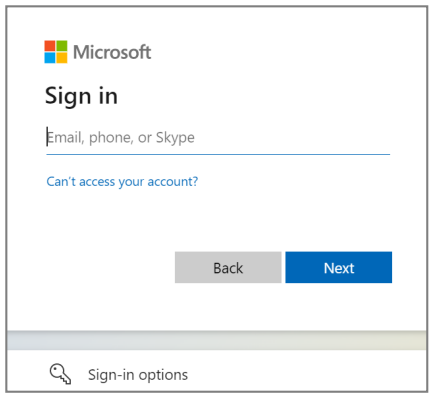
Effective Tuesday, May 31, Ballad Health will make a minor change in the login process for ServiceNow in order to create a more secure login. ServiceNow is where team members go on the Ballad Health intranet to make an IT service request or report an incident. Key facts facts about the change The login screen for ServiceNow will have a new look (see image). When logging into the ServiceNow portal, team members will use their balladhealth.org email address instead of their Ballad Health AD account name (the “u number”). Team members without a “u number” will need to call the service desk and will be unable to self-serve until migrated to a “u number.” When accessing from the intranet via a Ballad Health network device, you will only have to type in your password and “u number” the first time you log in, and it will be automatically saved after that. When accessing from outside…

Cybersecurity update: We’re making important policy changes, including email retention

To keep our patients and team members as safe as possible from cybersecurity risks, Ballad Health regularly evaluates our systems, processes and workflows to ensure we’re taking every precaution possible. Following a recent review of some of our policies, we are making several updates.  Email Retention and Mailbox Management Effective June 6, emails older than 90 days, instead of 180 days, will be removed from Outlook. This will apply to any folders team members have created within the email system. Emails that need to be preserved must be relocated. Personal email addresses will no longer be added to the Ballad Health Global Address List (GAL). Electronic Mail Communication Ballad Health email should not be used for personal use. Your Ballad Health passwords cannot be the same or similar to passwords for any of your personal accounts. Computer Access Codes Password length should be at least eight characters, but the use of passphrases with spaces separating…

Reminder: Ballad Health to shut down Outlook Web Access from non-Ballad devices on April 26

As a reminder, on Tuesday, April 26, at 5 p.m., Ballad Health is suspending all external access to Outlook Web Access (OWA) from any device that is not a Ballad Health-issued device. This means team members will no longer be able to view Ballad Health email if you access Outlook Web Access (mail.balladhealth.org) from a non-Ballad Health network device. NOTE: You will still be able to access your Ballad Health email from your personal cellphone, tablet or laptop through Exchange. Team members will also continue to be able to use a Ballad Health-issued device to access Ballad Health email through the OWA service. This change will primarily impact team members who log onto their email through Balladhealth.org, our external website, from the “Doctors & Team Members” page. (See image below.) Why are we doing this? Ballad Health is suspending this service as part of a coordinated initiative to better protect our health system from cybersecurity…

Cybersecurity advisory: Ballad Health to shut down Outlook Web Access from non-Ballad devices

Due to increased cyberattacks, Ballad Health is initiating a suspension of all external access to Outlook Web Access (OWA) from any device that is not a Ballad Health-issued device, effective on Tuesday, April 26, at 5 p.m. If you access OWA from a non-Ballad Health network, you will no longer be able to view Ballad Health email after that time. This change will impact team members who log onto their email through Balladhealth.org, our external website, from the “Doctors & Team Members” page. (See image below). Team members will continue to be able to access OWA by using a Ballad Health-issued device to access Ballad Health email. Click here to view the Ballad Health IT Advisory that was sent systemwide. NOTE: Access to OWA from a Ballad Health-issued device will NOT be affected. If you have additional questions regarding this service update, please contact the Service Desk at 423-431-6290.

More information on our mandatory password change

Due to a substantial increase in phishing attempts against Ballad Health’s email system, all Ballad Health employees will be required to change their network password. Team members will receive a prompt on their device to change their password between today and April 30. The forced password change will affect about 2,000 team members per day through the end of the month. This password change is different from the routine password changes that are scheduled every six months. If you are also due for a maintenance password change, it is recommended that you complete your routine password change in addition to this special one. A guide to creating a strong password 1. First and foremost, your Ballad Health password should NOT be the same as passwords you use for your personal accounts. Starting this week, it is Ballad Health policy to have unique and securely protected passwords that are different from the passwords you use for…

Missing icons following our Windows 10 update? Here’s why and how to fix it

IT is currently deploying the 20H2 update to Windows 10 across all Ballad Health devices. This is a minor but important update, because as of May 9, Windows will no longer provide technical support or fixes for new security risks on the old version of Windows 10. Since protecting our patients and their information is of utmost importance, this update is required. In addition to ensuring continued system security, the update will provide faster login times and increased performance within VDI. However, the first time you log into a new VDI session after the update has been applied, you may notice icons missing from the taskbar along the bottom of your screen. Any icons pinned to your taskbar prior to the update will be unavailable the first time you boot up your VDI on the 20H2 version. Fortunately, it’s very quick and easy to get them back on your own. Search for an application you…

Reminder: One-hour training sessions on MS Teams available through April 14

Ballad Health’s rollout of Microsoft Teams as our systemwide communications platform took place March 29. Transitioning away from other platforms, such as Webex and Skype, to a single platform through Microsoft Teams will provide a more satisfying and unified instant messaging and virtual meeting experience for team members, without the need to learn how to use multiple platforms. To help users get accustomed to Microsoft Teams, a series of one-hour training sessions are offered, with classes scheduled through Thursday, April 14. The one-hour training sessions provide team members with beginner-level information on how to get the most out of the chat and meeting functions of MS Teams. You can enroll in these sessions in HealthStream by searching for “Microsoft Teams Chat and Meetings (Level 100)” under the Event Calendar Tab. (NOTE: Classes on Tuesday night, April 5, are canceled.) To help make the most of the new tool, tip sheets and training videos can be…

Microsoft Teams has been rolled out; here’s what you need to do next

Ballad Health’s rollout of Microsoft Teams as our systemwide communications platform took place on Tuesday, March 29. Transitioning away from other platforms, such as Webex and Skype, to a single platform through Microsoft Teams will provide a more satisfying and unified instant messaging and virtual meeting experience for team members, without the need to learn how to use multiple platforms. WHAT YOU NEED TO DO Shut down and restart your computer. Log into your Ballad Health account. Go to the bottom left corner and click on the Microsoft squares symbol to display the scrollable menu of programs on your computer. Microsoft Teams should appear just below the Microsoft Store icon. Right-click to see “More” and then click on “Pin to taskbar.” Now Microsoft Teams will be readily accessible from your taskbar with one easy click. While we encourage team members to begin using MS Teams right away, we will have a minimum six-month period after…