


For team members who have the latest iPhone models, here’s a quick reminder on how to download the Ballad Teams team member app to your phone. We’ve put together a 40-second instructional video (see bottom of this article); the process is very quick and easy!
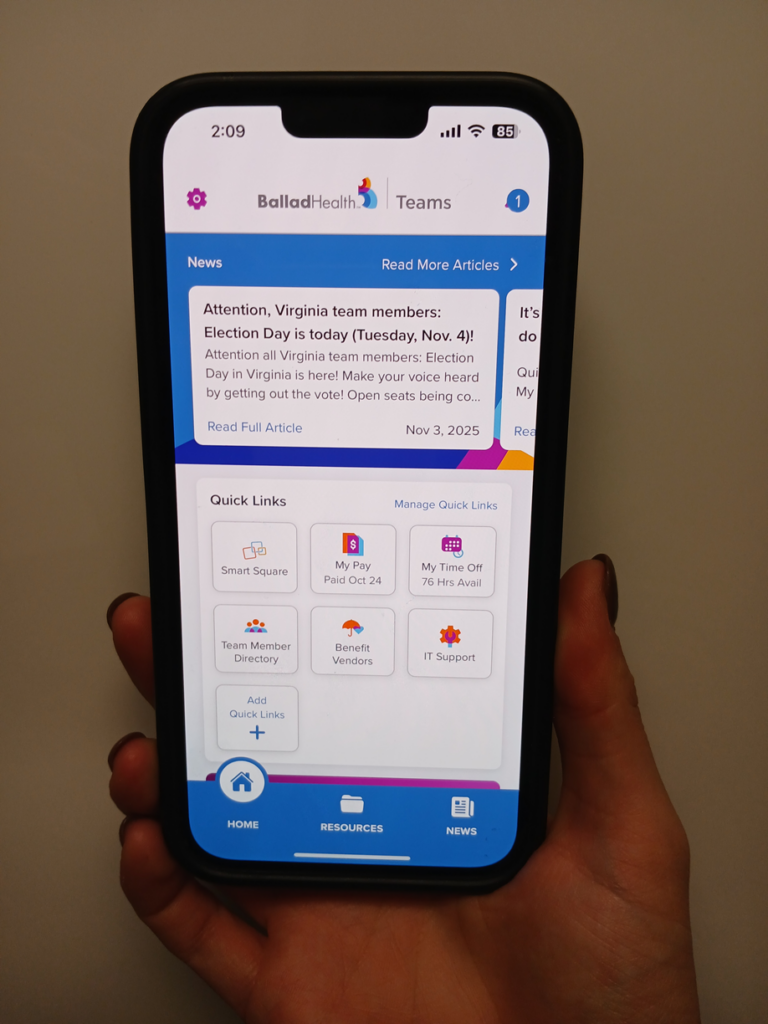
And for all team members – more than 9,000 of us are using Ballad Teams, our mobile team member app. Have you downloaded it yet?
What is Ballad Teams?
The Ballad Teams mobile app offers team members important system news and easy access to an array of other useful resources like your pay statements, PTO balance, team member discounts, IT support, benefits, and a link to log into Smart Square scheduling. We continue to add new features.
For any team members who downloaded Ballad Teams previously but have since lost the app – perhaps from updates to your phone, or you may have a new phone altogether – or if you’ve never had the app before, here’s how to get it.
NOTE: There is a link on the Ballad Health intranet main page, under “Quick Links” and “Ballad Teams Mobile App,” that provides quick instructions, as well.
Installing or reinstalling the app
(See video at the bottom for iPhone 13 or newer)
To do so, follow this link for instructions.
- For iPhone/Apple devices, you will need a code to download the app. The code is provided by following the above link. NOTE: Only one code should be needed per Apple account, so if the code has already been downloaded previously on the account, you should be able to follow the directions listed here to redownload it.
- For Android users, no code is needed. You can directly download the Ballad Teams app from the Play Store without using a code.
- Once the app is downloaded to the phone, a Ballad Health network login is required to open Ballad Teams.
Manually updating your app
In order to receive any Ballad Teams app updates, some users may need to manually update their app, if they don’t have their phones set to automatically update. To do this, you may need to manually update your app by following the steps below.
On the App Store:
- Tap your profile icon at the top of the screen.
- Scroll to see pending updates and release notes.
- Tap Update next to an app to update only that app or tap Update All.
On Google Play:
- At the top right of the screen, tap the profile icon.
- Tap Manage apps & device. Apps with an update available are labeled Update available. You can also tap See details to see a list of apps with an update.
- Tap Update.
IMPORTANT REMINDER: It you want to receive push notifications alerting you to important Ballad Health news, be sure to set your phone so Ballad Teams notifications are turned on.
