


Ballad Health uses Everbridge to send out emergency communications and alert team members to situations such as dangerous weather or active shooter scenarios. While you may already receive alerts through text or email depending on your Everbridge settings, you can now catch systemwide and location-specific alerts quickly and easily via Ballad Teams push notifications and view the full details of those alerts in the app’s notification center. To access the notification center, tap the bell icon on the home screen after logging into the app.
You do not need the Ballad Teams app to receive Everbridge emergency alerts.
You can change your Everbridge settings here, including which location alerts you’re subscribed to.
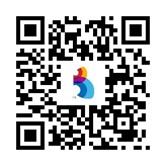
You can download the Ballad Teams app by scanning the QR code below, or by clicking this link if you’re on your mobile device.
Updating your Ballad Teams app
To receive emergency alerts as push notifications and view them in the notification center, your Ballad Teams app will need to be updated to version 3.12.1 or higher. You can find the version your app is running at the bottom of the login page.
If your app is running an older version, you can update it using the following methods:
On the App Store:
- Tap your profile icon at the top of the screen.
- Scroll to see pending updates and release notes.
- Tap Update next to an app to update only that app or tap Update All.
On Google Play:
- At the top right of the screen, tap the profile icon.
- Tap Manage apps & device. Apps with an update available are labeled Update available. You can also tap See details to see a list of apps with an update.
- Tap Update.


